
How to improve AI through data integrity with MCP.
Many AI projects start out with the same goal: To automate a process with many time-intensive steps using a system that can produce exactly the intended result much faster and with fewer mistakes than before. However, this description fits both AI and process automation projects. The main difference between the two is function-calling vs. agentic behavior. If you can map out the process steps and clarify the “How”, then Process Automation is a great place to start. If you need an adaptive process and have to deal with more complex or unpredictable steps, then the agentic approach is preferable. But agentic systems have one flaw, that might derail a project: Because an agent may choose which steps to take, it is difficult to predict what steps are taken. The process might produce the correct result and it might not. One of the possible reasons for an unexpected behavior is missing or false context. In this blog post Andreas Nicklaus, BTP Architect at sovanta, describes how to improve AI through data integrity with MCP.
Without the information that is required to perform the right actions, the chance for an AI Agent to perform correctly is low. There is a real need to provide information and define interaction methods to an AI agent in order to guide the agent in the right direction. This is where MCP comes in.
We introduce MCP (Model Context Protocol)
The Model Context Protocol, MCP for short, is Anthropic’s open solution for integrating their AI service Claude with external systems. As the name suggests, it defines the provisioning of context data (and metadata) for AI models. Through proper implementation of the Model Context Protocol, we can provide tools and data sources to the model which can be used by the model as one of the steps of any process. This way, we can effectively control some part of the agent’s behavior because we outsource it to an external process.
The communication in MCP is bidirectional
Not only can we send requests to our server, but the connection may also be used by the server to make use of features of the AI host. For example, imagine a server-side action that involves sending an email about data analysis results. If this analysis result is triggered, the results and priority of those results might not be possible to be parsed into an email template. So, a server that fully embraces the usage of MCP can outsource the text creation to the AI host, if it supports it, and send it. Through this process, each participating party only performs actions it is suited for.
The third participant in MCP apart from host and server is the client. A single host can provision multiple clients, which facilitate the communication between host and server. Most importantly, clients are the middlemen for communication and are in charge of negotiating the host’s capabilities to the server and vice versa.
Let’s dive deeper into MCP
In order for each party to make use of the others’ functionalities, client and server express their capabilities as “primitives”. Servers may provide three types of primitives: Tools, Resources and Prompts. Clients have four possible types of primitive: Sampling, Elicitation, Logging, and Roots. During capability negotiation on connection initialization, each party states its supported primitives as a contract to ensure support throughout the connection lifetime.
Server primitives
If you already understand HTTP, server primitives will be easily understood. Tools are server-side actions, either simple, like HTTP POST requests to create objects, or more complex actions like initiating a multistep process. If you get started with MCP, I suggest getting started with tools because it will come most naturally to many backend developers and can be used for versatile use cases. After all, it is not restricted what “action” has to mean. For example, you might just implement an action that provides the current list of open orders in your retail system.
Resources are the server primitive to express any kind of source of information. You could define a set of PDF files, a database connection or even a video stream as a source. Each resource is defined by a unique URI and a MIME Type. Through it, direct resources with a fixed URI and resource templates with dynamic URIs with parameters are supported. The MIME type is there to make sure that the host can handle the type of information.
Through Prompts may the server provide reusable templates for parameterized prompts. This allows agent developers to prepare the prompts to achieve the intended goal. This is especially important for complex tasks that involve multiple steps and multiple tools. For example, a prompt “plan-vacation“ should have expected arguments “destination” and “vacationType” and return an expanded prompt instructing the model to perform multiple tasks in order to achieve the goal of a finished vacation plan.
Client primitives
On the other side of things, the client also provides some functions to the server, so that it may make use of the host’s capabilities. The easiest client primitive to understand is definitely Logging. The client may support collecting logs from the server. This is especially useful if the server cannot process an MCP request. Through the Logging primitive, the host may provide an answer to the user that describes why the task cannot be fulfilled, or the question cannot be answered.
Sampling allows the server to use the host through the client to directly prompt the host. Mostly, this should be used when some information needs to be generated that outgrows the capabilities of the server. Again, both parties should only be used for their own purpose. It is important to state that there should always be a human in the loop for review and revision by the user before prompts are forwarded to the model.
In addition, a client may support Elicitation. If it does, the server can elicit specific information from the user. This communication should not be forwarded to the AI model, but allows communication between server and user directly through the host application. For example, the server might ask the user when planning a vacation: “What is the address you want to start your journey in?”
Lastly, Roots specify allowed paths the agent is allowed to access. Roots are typically exposed through interfaces for workspaces or project configurations. If you get started with Roots, I’d suggest carving out a playground directory on your machine and initiating an MCP client with a Root pointing to that directory. This will ensure that the agent will only have access to that directory, but also may open up a security risk if access is configured too generously.
How to apply MCP?
To fully grasp the concepts of MCP, let’s implement some clients! For demonstration purposes, the examples chosen here are simple and use local as well as remote services as MCP servers. For the remote server, SAP tools will be used to make it simple, but to be fair, any other similar tools would most likely do the trick. Because they are easy to implement, the focus lies on the server primitive Tool and the client primitive Root. This example shows the following steps:
- Set up a remote server with support for Tools
- Create a playground directory as a Root
- Provide clients to a host application for both services
For the remote server, we need to provide support for Tools.
In this example, let’s take an existing CAP server and create an extension to it. After installing the CAP-plugin for MCP, all that needs to be done is to annotate the service entities:
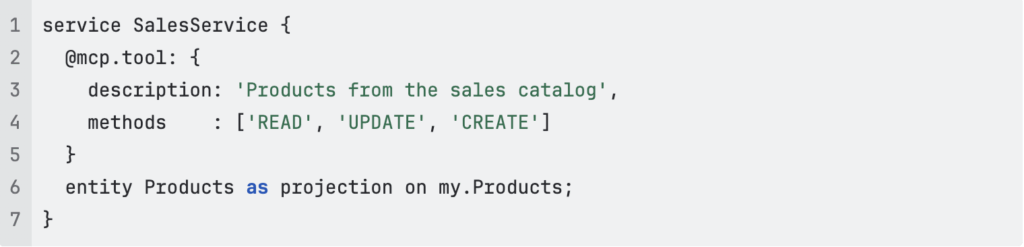
And that’s it! The MCP inspector tool reveals that three tools were created with the correct parameters, one for each allowed method on each entity. In order for an agent to use these tools, all you need to do is to deploy your CAP server. Note down the URL for now.
In order to provide a Root to the MCP host application, we’ll need… well, a root.
Create a directory anywhere on your system and copy files to that directory you’ll need the agent to access. Make sure to never make any sensitive files available in this directory. The contents of any file in this directory or subdirectories will eventually end up in the context of the agent. If you don’t want to make that information available to the provider of the agent, protect this directory! That is all you need for a Root! Note down the absolute path to the directory.
Now let’s make that available to an agent.
For the MCP host application, Claude Desktop will be used for their ease of use in regards to MCP. However, many (so many) other applications support MCP features. Joule will also support it very soon and judging from what we can tell internally, it’s going to be awesome!
Adding MCP clients to Claude Desktop requires editing a config file called claude_desktop_config.json, so you need to know what you are doing, but here is what you need for this example:
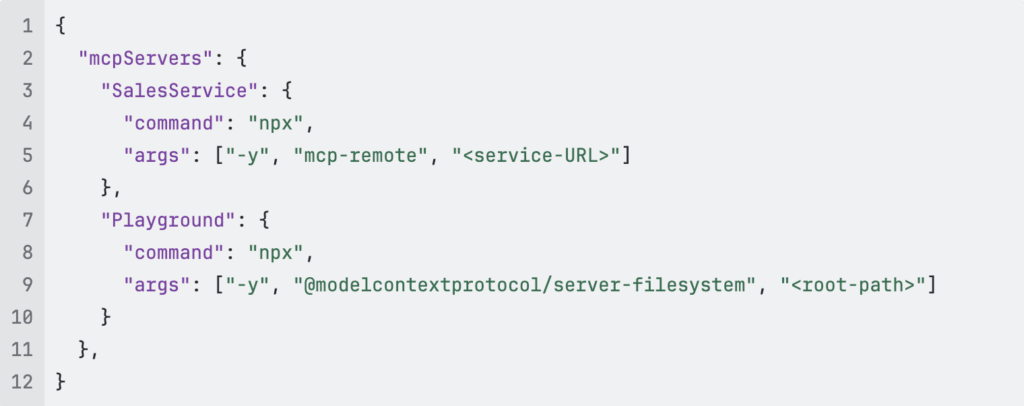
If you are technically versed, you will notice that both clients use local commands. The Playground client uses the node package server-filesystem to provide a client based on the root path you provide. Make sure to replace “<root-path>“ with the absolute path of the playground directory. The Sales Service uses the MCP-remote package to proxy request to the remote server. Replace “<service-URL>” with the URL you noted down earlier. Now, restart Claude Desktop.
And you’re done!
The application can now use the clients to read, edit or delete existing files, create new files and query the current products in the sales catalog. This setup integrates tasks in one application. Instead of exporting a list of products, analyzing the data with AI and then creating a presentation about the results manually, we can now simply prompt “Analyze the current product data and create a Powerpoint presentation on the results” without worrying about the data actually being up to date and which directory the presentation has to be saved to.
Any question how to apply the MCP concept in your AI project? Let’s talk!